// writeup
Proxmox Homelab
The Setup
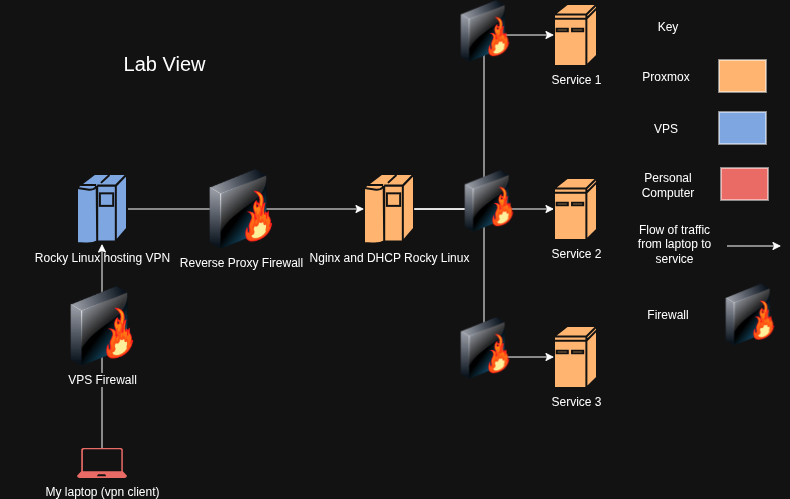
The goal is to set up a home lab running services in a secure manner. I wanted to do this since it sounds like an interesting idea. By running services like nextcloud on your own computer for cloud storage you can stop 3rd parties like Microsoft and Google from reading your private sensitive data and selling to advertisers. There are also services that can be self hosted with great utility such as SearXNG to act as a search engine aggregator.
How I Decided To Set Up The Lab
So I wanted to make sure that the lab was secure first and foremost. So I decided to implement zero trust and defense in depth security principles.
Operating System Choice
So I decided to go with Rocky Linux for the operating system choice for all machines on this lab, except Proxmox. Proxmox is a great virtualization platform and it uses KVM under the hood to run the virtual machines. Rocky Linux is RHEL but free. You normally need to pay for access to RHEL but since RHEL is open source people just took the RHEL code and made a clone called Rocky Linux. I will use Rocky Linux for the vpn, nginx, as well as hosting all the services because I like the RHEL ecosystem.
VPN
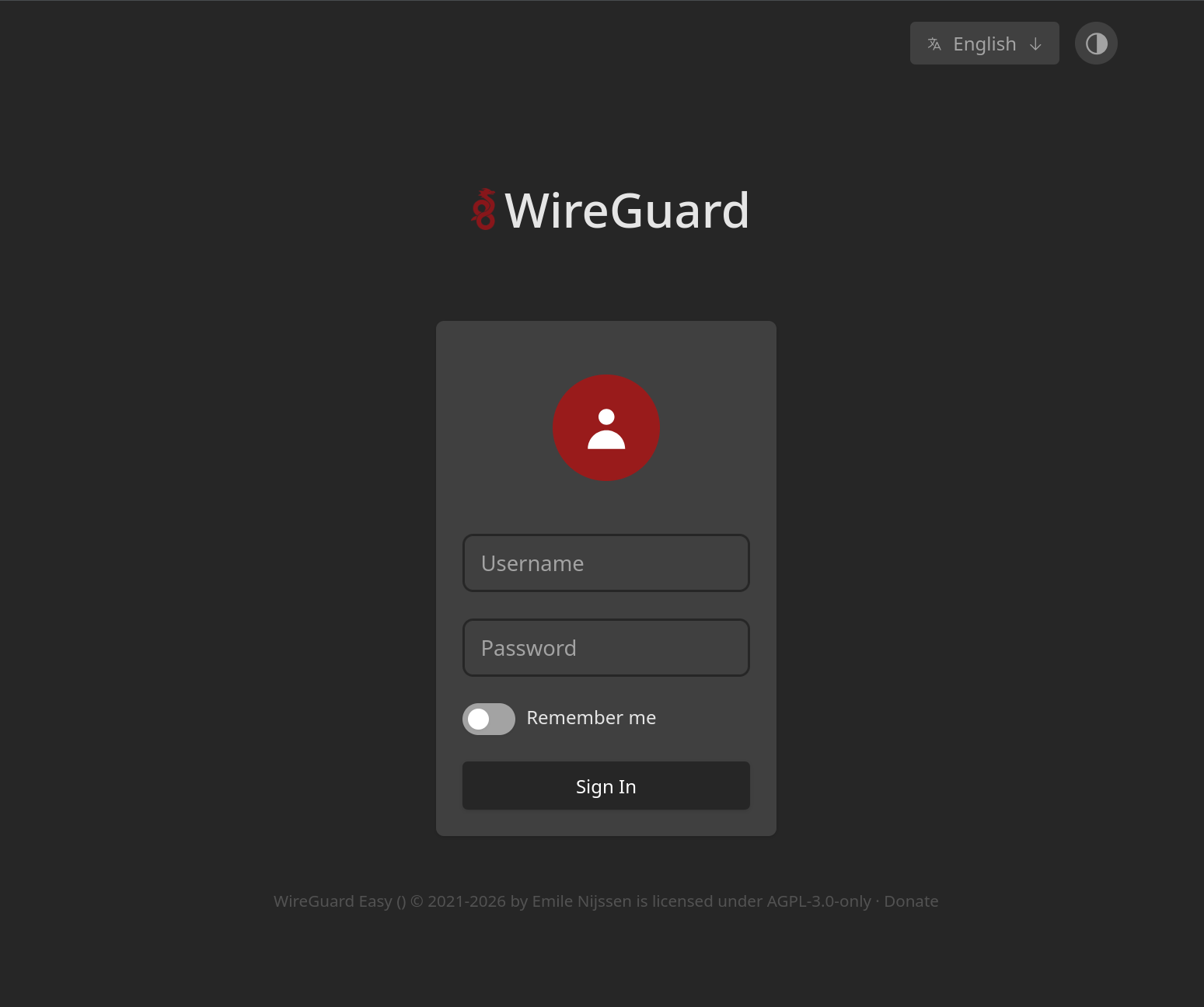
Many large organizations gate access to internal network resources by using a VPN. In regards to my home lab I will use this as a VPN. There are two choices in terms of VPN protocols to use. That is Wireguard and OpenVPN. I opted for Wireguard as its codebase is about 7,000 lines of code for its protocol as opposed to the 150,000+ lines of code for Openvpn. Generally as a rule in security, a smaller code base has less attack surface and is this more secure. WireguardEasy Podman container is being used for the WebUI. Its a good idea to use Podman over Docker due the smaller attack surface as well as the fact that Podman is RHEL native.
          [rhelpro@rockylinux etc]$ systemctl status nginx-proxy
          ● nginx-proxy.service - Nginx Reverse Proxy
              Loaded: loaded (/etc/containers/systemd/nginx-proxy.container; generated)
              Active: active (running) since Wed 2026-05-27 12:37:00 CDT; 16min ago
          Invocation: 6cba7a4a8d674bf08f23b1d8e6acefc6
            Main PID: 1283 (conmon)
                Tasks: 4 (limit: 10282)
              Memory: 59.6M (peak: 70.6M)
                  CPU: 107ms
              CGroup: /system.slice/nginx-proxy.service
                      ├─libpod-payload-9c9f813f3f9996d6de16f8823d123f065ccd3e493aeb2ef4e9c24f955eb92daf
                      │ ├─1287 "nginx: master process nginx -g daemon off;"
                      │ ├─1317 "nginx: worker process"
                      │ └─1318 "nginx: worker process"
                      └─runtime
                        └─1283 /usr/bin/conmon --api-version 1 -c 9c9f813f3f9996d6de16f8823d123f065ccd3e493aeb2ef4e9c24f955eb92daf -u 9c9f813f3f9996d6de16f8823d123f065ccd3e493aeb2ef4e9c24f955eb92daf -r /usr/bin/crun -b /var/lib/containers/storage/overlay-containers/9c9f813f3f9996d6de16f8823d123f065ccd3e493aeb2ef4e9c24f955e>

          May 27 12:37:00 rockylinux nginx-proxy[994]: 9c9f813f3f9996d6de16f8823d123f065ccd3e493aeb2ef4e9c24f955eb92daf
          May 27 12:37:00 rockylinux nginx-proxy[1283]: /docker-entrypoint.sh: /docker-entrypoint.d/ is not empty, will attempt to perform configuration
          May 27 12:37:00 rockylinux nginx-proxy[1283]: /docker-entrypoint.sh: Looking for shell scripts in /docker-entrypoint.d/
          May 27 12:37:00 rockylinux nginx-proxy[1283]: /docker-entrypoint.sh: Launching /docker-entrypoint.d/10-listen-on-ipv6-by-default.sh
          May 27 12:37:00 rockylinux nginx-proxy[1283]: 10-listen-on-ipv6-by-default.sh: info: Getting the checksum of /etc/nginx/conf.d/default.conf
          May 27 12:37:00 rockylinux nginx-proxy[1283]: 10-listen-on-ipv6-by-default.sh: info: Enabled listen on IPv6 in /etc/nginx/conf.d/default.conf
          May 27 12:37:00 rockylinux nginx-proxy[1283]: /docker-entrypoint.sh: Sourcing /docker-entrypoint.d/15-local-resolvers.envsh
          May 27 12:37:00 rockylinux nginx-proxy[1283]: /docker-entrypoint.sh: Launching /docker-entrypoint.d/20-envsubst-on-templates.sh
          May 27 12:37:00 rockylinux nginx-proxy[1283]: /docker-entrypoint.sh: Launching /docker-entrypoint.d/30-tune-worker-processes.sh
          May 27 12:37:00 rockylinux nginx-proxy[1283]: /docker-entrypoint.sh: Configuration complete; ready for start up
          [rhelpro@rockylinux etc]$
Nginx (Status of Service Above)
If the server were to somehow become compromised I have a second layer of defense. That is the Nginx Reverse Proxy. Reverse proxy's offer protection by preventing potential attackers from connecting directly to the server. You must pass through the reverse proxy first before connecting to the server. Nginx reverse proxy is like a security guard at the front desk. By having defense in depth even if one layer is compromised, the whole system isn't.
Firewalls
Since I decided to use all Rocky Linux for this all the virtual machines on this home lab, I just had to set up firewalld and do least privilege settings. Firewalld is a significantly more powerful firewall in my experience than UFW having significantly more options like firewall zones. For Firewalld alone I would recommend Rocky/RHEL over Ubuntu.